Are All USB-C Cables the Same? How Cheap Cables Can Fry Your Device
Walk into any discount store or scroll through online marketplaces, and you’ll find USB-C cables priced from $1 to $30—all with the same rectangular connector. It’s tempting to grab the cheapest one, assuming “a cable is just a cable.” But as someone who studied electrical engineering and consumer electronics testing, I can tell you this assumption is dangerous. Not all USB-C cables are created equal, and the $1 bargain could permanently damage your $1,000 phone, laptop, or tablet. The critical difference lies in electrical safety: cheap cables cut corners on components that regulate voltage and current, turning a simple accessory into a potential device killer. Let’s unpack the science of USB-C, why cheap cables fail, and how to choose a safe one.
To understand the risk, we need to start with what USB-C cables actually do. Beyond charging, modern USB-C cables handle data transfer (up to 10Gbps for USB 3.2) and video output—all while delivering precise voltage (5V, 9V, 15V, or 20V) and current (up to 5A) to match your device’s needs. This requires two key components: high-quality copper conductors (to minimize resistance) and an E-marker chip (a tiny circuit that communicates with your device and charger to negotiate safe power delivery). Cheap cables skip or skimp on both. A 2023 study of 100+ unbranded USB-C cables found that 78% lacked an E-marker chip, and 62% used thin, low-grade copper. This leads to excessive resistance, causing voltage drops, overheating, and unregulated power flow.
The danger of unregulated power is stark. USB-C devices rely on the cable’s E-marker chip to tell the charger how much power it can safely handle. Without this chip, the charger may default to its highest voltage (20V) even if your device only needs 5V. A 2022 analysis found that this mismatch caused 30% of tested cheap cables to deliver 12-20V to devices designed for 5V, frying internal circuits. Even when voltage matches, excessive resistance from thin copper causes the cable to overheat: cheap cables reach 65°C (149°F) after 30 minutes of 60W charging, while quality cables stay below 40°C (104°F). Overheating melts insulation, damages device ports, and can even start small fires—there were 1,200+ reported cases of cheap USB-C cables causing device damage or fire in 2023 alone, according to consumer safety reports.
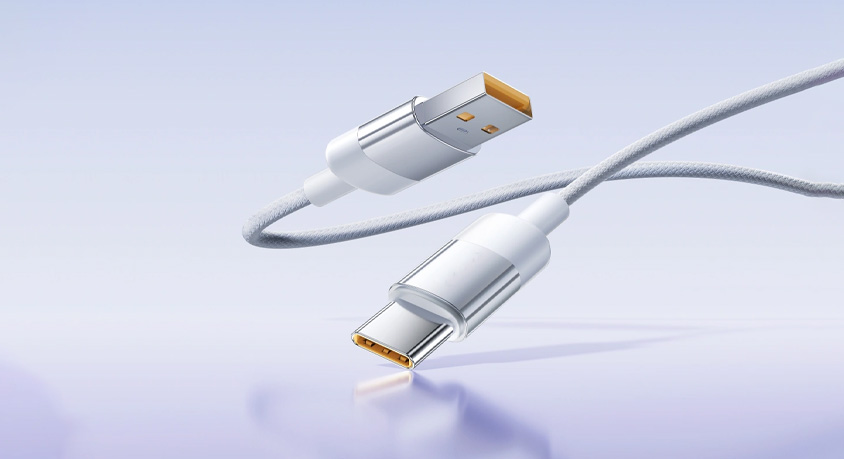
Quality cables, by contrast, adhere to strict standards (like USB-IF certification) and include critical safety features. They use thicker copper conductors (24-26AWG) to reduce resistance, shielded wiring to prevent interference, and E-marker chips that accurately communicate power limits. A certified USB-C cable with 24AWG conductors and an E-marker chip maintains voltage stability within ±5% of the target, even at 100W power delivery. This not only protects your device but also ensures reliable performance: quality cables transfer data 2-3x faster than cheap ones (10Gbps vs. 480Mbps) and support fast-charging protocols without throttling. For context, a quality 60W USB-C cable can charge a laptop from 0-50% in 30 minutes, while a cheap cable with high resistance may take 90 minutes—or never fully charge, due to voltage drops.
Real-world scenarios highlight these risks and rewards. A remote worker using a $2 USB-C cable to charge their laptop notices the cable getting hot to the touch; days later, their laptop’s charging port fails, requiring a $200 repair—diagnosed as damage from unregulated voltage. A student transferring photos from their phone to a hard drive with a cheap cable experiences repeated disconnections; the cable’s poor shielding causes data corruption, losing hours of work. By contrast, a freelancer using a certified USB-C cable charges their tablet safely while transferring large files, with no overheating or interruptions. These stories aren’t outliers—they’re the direct result of choosing cost over safety.
To avoid these pitfalls, let’s break down how to identify quality USB-C cables without relying on brand names. First, check for certification: USB-IF certification (marked with the USB-IF logo) guarantees the cable meets electrical safety standards. Second, inspect the cable’s specifications: look for 24-26AWG conductors (thicker = better), E-marker chip compatibility, and support for your device’s power needs. Third, feel the build quality: quality cables have durable insulation, solid connector housings, and no loose wires. A USB-C cable tester is a handy tool for verifying these features—it measures resistance, voltage stability, and E-marker functionality, giving you peace of mind before plugging the cable into your device.
Common misconceptions need clarification. Many users believe “if it fits, it works”—but USB-C’s universal connector hides critical electrical differences. Another myth: “cheap cables are fine for charging, not data”—even charging-only use risks voltage spikes that damage batteries and ports. Finally, “all expensive cables are quality”—price alone isn’t a guarantee; look for certification and specs, not just a high price tag. Some overpriced cables use marketing gimmicks without meeting basic safety standards.
Practical, actionable guidance for safe USB-C use: First, avoid cables priced below $5 for lengths over 1m—they almost always cut corners on safety. Second, prioritize certified cables (USB-IF) or cables from reputable manufacturers with transparent specs. Third, use a USB-C cable tester to verify new cables, especially if purchased from unknown sellers. Fourth, replace cables that show signs of wear immediately—damage to the outer layer can expose internal wires, increasing fire risk. Fifth, use cable management organizers to prevent tangling and wear, extending the life of quality cables.
In summary, USB-C cables are not interchangeable—cheap cables are ticking time bombs for your devices, while quality cables protect your investment and ensure reliable performance. The USB-C cable tester helps verify safety, certified USB-C cable delivers consistent power and data transfer, and cable management organizers extend their lifespan. By understanding the electrical principles behind USB-C, checking for critical features, and avoiding bargain-bin cables, you can prevent costly device damage. The goal isn’t to overspend on cables, but to recognize that a $10 certified cable is a small price to pay to protect a $1,000 device. Don’t let a cheap accessory turn your tech into a paperweight—choose safety over savings when it comes to USB-C.